For New Learners
A key aim is to use resources, both software and hardware, that can be used with little or no supervision and can be used for initial learning through to more advanced work. We are also looking at resources that can combine art and technology and drive innovation.
Scratch and block based languages, familiar to children, are currently being used to integrate art and technology projects. More recently they are also being used by beginners who want to learn a wide range of AI and Machine Learning. As even the smallest robots require more power than can be produced by most single board computers and micro processors, they tend to use control boards. Therefore very simple computers can be used to control the boards. For beginners we will initially be focusing on the use of Scratch, Makecode and Microbits.
Using self directed resources from Raspberry Pi Foundation, Makecode and Microbit it is possible to cover simple animations, robotics, combined art and technology projects, environmental monitoring and AI machine learning. Some quite innovative projects are possible.
Advanced AI art can be created using Jwildfire, Deepdream, Microsoft AI and a Digital Editor. Integrating this art into scratch is very simple.
The Raspberry Pi foundation are currently developing a Python animation platform, which can be used by beginners. This can found on their web site. The material is relatively simple and provides an interesting starting point for beginners. You can also integrate artwork that has been created using the arts tools.
To provide a wide range of projects, additional hardware can be used with the Microbit, including breakout boards to control electronics and monitors, environmental monitors, robotics controllers and hardware to integrate with other computers. It can also be controlled by Scratch.
Once beginners become familiar with creating interesting and innovative projects using these straightforward tools, they can move on to using Python for coding and Raspberry Pis and Arduinos for robotics and AI. They can also use the more advanced features of Jwildfire for fractal graphics and Deepdream for AI.
Our Top Resource Providers for our Training Platform
https://makecode.microbit.org/
https://kitronik.co.uk/blogs/resources/tagged/coding-tutorials
https://www.arduino.cc/education/courses
https://machinelearningforkids.co.uk/
https://playground.raise.mit.edu/
https://teachablemachine.withgoogle.com/train
https://httyr.media.mit.edu/home (MIT how to train your robot using machine learning)
Key Technology and Applications for our Training Platform
New Learners
Large Language Models and Assistants from Microsoft, Google and Chat GPT
Digital Art using Adobe, Photoshop Elements
Fractal Graphics using JWildfire
AI Graphics using Deepdream
Microbit
MicroBit sensors and electronics
AI Vision using HuskyLens
Kitronik Microbit Robotics
Kitronik Environmental Monitors
MeArm Robot Arm controlled using a servo board, with a Microbit
Elecfreaks Cutebot robot for machine learning with MIT
Raspberry PI
Raspberry Pi electronics and sensors
Scratch programming
MicroPython programming
Innovation integration combining art and technology
More Advanced Learners
Arduino
Arduino programming
Arduino Robotics
Python programming
P5.JS programming
Raspberry Pi Robotics
Raspberry Pi AI (TPU)
Advanced Innovation integration of art and technology
Video of a Scratch Programme that demonstrates a range of AI. Scratch was chosen as children are familiar with it and it greatly reduces the complexity of running complex AI algorithms. I created all the images, did the programming and trained the AI Machine Learning algorithm. The original idea and simple example code came from The Pi foundation, supported by Machine Learning for Kids.
The Scratch programme uses the following learning resources for children.
https://scratch.mit.edu/ Scratch
https://machinelearningforkids.co.uk/ Machine Learning Examples
https://machinelearningforkids.co.uk/scratch/ Scratch editor and extensions
https://playground.raise.mit.edu/main/ AI Scratch editor and extensions
https://teachablemachine.withgoogle.com/ Create AI models and train them
https://jwildfire.overwhale.com/ Fractal Images based on chaos theory
https://deepdreamgenerator.com/ AI Deep Dream Generator
Copilot Bing AI Assistant
https://p5js.org/ Process language based on Java Script
Photoshop Elements Photoshop Photo Editor
Machine Learning Course
Having completed Introduction to Machine Learning and AI from The Raspberry Pi Foundation, I can recommend the course. The first chapter is particularly useful for children as it teaches them how to train a Machine Learning Model and use it within a Scratch Program. I use this as an initial base for the Scratch program, which is shown above. The course provides a good overview of Machine Learning and is particularly useful for Teachers.

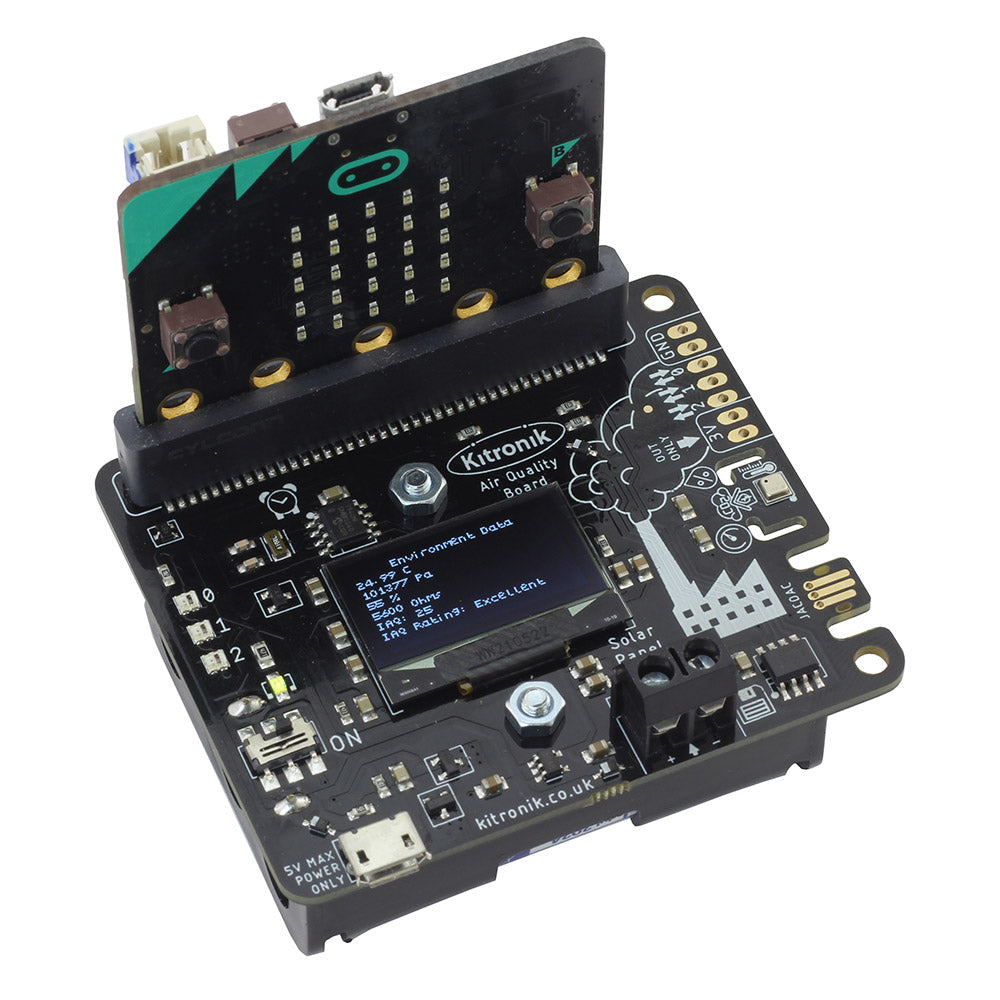
The image below is an Environmental Monitor based on a Microbit and a Kitronik Environmental Monitor Kit. It monitors air quality. I use the readings for both science and art projects. For art the readings are converted to Red, Green and Blue colour numbers which are used during image editing. I have taken readings across Ainsdale Sand Dunes for projects.
The Atkinson – An example of a simple book developed using AI. The images use a combination of art and technology.
https://drive.google.com/file/d/1DOqvgcJuTznhMmm0uDNGdUOwHAp-UbH2/view?usp=sharing
 Southport Innovation Centre